
Two real lenses, 85 mm apart, already in your pocket.
展开折叠屏,唤醒口袋里的 85 mm 双目立体相机。
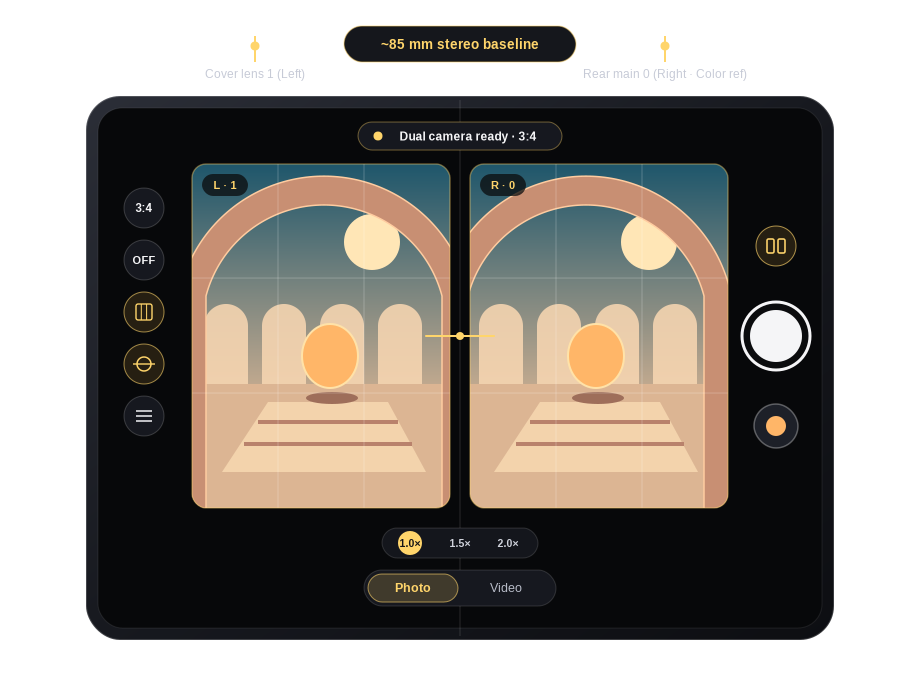
Hold an unfolded book-style foldable upright and its cover lens and rear main camera face forward together at wide, natural stereo separation. StereoSpan pairs both sensors in real time for 3D photos and 30 fps spatial video—kept privately on your handset with zero servers.
将展开的大折叠手机竖直握持、内屏朝向自己,外屏自拍镜头(左眼)与后置主摄(右眼)即可同时朝前取景,形成约 85 mm 的自然宽基线立体视差。StereoSpan 实时同步双路传感器拍摄 3D 照片与 30 fps 立体声视频,全程本机私有存储,零云端上传。
- Physical baseline
- 物理立体基线
- ~85 mm
- Per-eye ratios
- 单眼原生画幅
- 3:4 · 9:16 · 1:1
- Video & sound
- 双路视频规格
- 30 fps · AAC
- 30 fps 立体声
- Data uploaded
- 云端数据收集
- 0 bytes
- 0 字节
Why an unfolded baseline outperforms narrow dual-lens modules
为什么展开态 85 mm 宽基线远胜常规窄距双摄
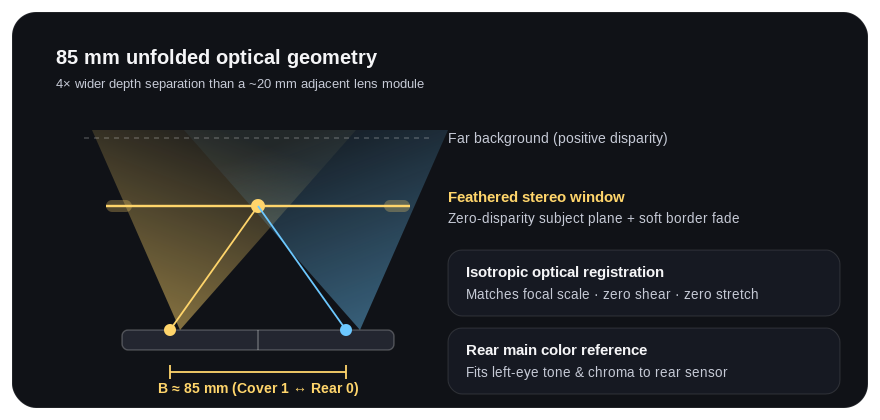
Adjacent lenses on a flat phone sit roughly 18–24 mm apart, flattening depth beyond arm's length. Unfolding a book-style handset widens the optical baseline past human interpupillary distance (~63 mm) to roughly 85 mm—giving architecture, courtyards, street scenes, and environmental portraits tangible volume in a headset.
传统直板手机的相邻双摄间距通常只有 18 mm 至 24 mm,超出两米后立体层次便迅速衰减。展开折叠屏后,左右镜头间距扩展至约 85 mm(略宽于人类约 63 mm 的瞳距),让庭院建筑、街景纪实与环境人像在头显中呈现出扎实的空间纵深。
-
Rear Main Camera color reference
后置主摄基准色彩拟合
Two different sensors never match by ISO numbers alone. StereoSpan preserves natural preview brightness and uses the flagship rear camera as the untouched color reference, fitting the cover eye's monotonic luminance curve and chroma across corresponding patches while rejecting specular highlights and occlusions.
两颗不同传感器的色彩无法仅靠统一 ISO 对齐。StereoSpan 保留实时取景原生亮度,以旗舰后置主摄作为无损色彩基准,基于对应图像块为左眼拟合单调亮度曲线与色度,并自动剔除高光溢出与视差遮挡区域。
-
Isotropic magnification registration
等比焦距配准,零剪切零拉伸
Before horizontal or vertical alignment, StereoSpan matches angular magnification between the rear and cover optics using one uniform scale across both axes—enforcing zero one-dimensional shear and zero non-isotropic stretch across preview, viewer, and export.
在进行垂直对齐与视差调节前,StereoSpan 先按实测光学比例对较广一侧画面做中心等比裁切,确保预览、相册与导出全程零单向剪切、零非等比拉伸,双眼线条严丝合缝。
-
Feathered stereo window for XR headsets
柔和羽化立体窗口,消除头显边缘冲突
New captures compute an automatic near-subject stereo window from foreground disparity and apply a subtle, symmetric border fade in output space—eliminating harsh left/right frame-edge rivalry in Meta Quest 3 and Apple Vision Pro while leaving your original files untouched.
新拍摄的原片会根据前景视差自动设定舒适的立体窗口平面,并在导出画面边缘施加细腻的对称圆角羽化,有效缓解在 Meta Quest 3 与 Apple Vision Pro 中观看时的边框视差冲突,同时不改动任何原始像素。
Engineered from sensor timestamp to headset playback
从传感器时间戳配对到头显直出的一体化管线
StereoSpan separates capture from presentation: record both eyes cleanly once, keep the immutable master in private storage, and export any viewing format later without re-shooting.
StereoSpan 将双路采集与后期观看彻底解耦:拍摄时完整保留左右眼原始流与时间戳,存入应用私有相册,之后随时按需渲染任意头显或屏幕格式。
Synchronized Dual Capture
双路同步拍摄控制
- Framing ratios
- 多画幅切换
- Switch per-eye framing between
3:4(Open Gate video1920×1440),9:16(1920×1080), and1:1(1440×1440). Photo and video remember ratios independently. - 支持单眼
3:4(Open Gate 视频达1920×1440)、9:16(1920×1080)与1:1(1440×1440)画幅,拍照与视频独立记忆比例。 - Timing & codecs
- 编码与立体声
- OIS and EIS locked off to prevent independent eye drift;
elapsedRealtimesensor pairing, 30 fps H.264 or optional high-efficiency HEVC, plus stereo AAC audio or zero-permission muted recording. - 锁定关闭 OIS 与 EIS 以杜绝双眼独立漂移;采用传感器实时时钟配对,支持 30 fps H.264 或高效 HEVC 编码,支持立体声 AAC 收音及免麦克风权限的静音录制。
- Optics & aids
- 对焦与构图辅助
- Synchronized crop zoom, parallax-mapped tap focus & AE/AF lock, multi-level rear fill torch,
3×3rule-of-thirds grid, roll spirit level, 2 / 5 / 10 s self-timer, and cover-screen subject preview. - 提供双眼同步裁切变焦、点按测光对焦与 AE/AF 锁定、多档后置常亮补光灯、九宫格构图线、电子水平仪、2 秒至 10 秒倒计时及外屏被摄者预览。
- Safety guards
- 空间与温控保护
- Live capacity readout, advisory near-subject / occlusion / fast-pan comfort cues, and automatic graceful finalization if storage hits the safety floor or thermal pressure rises.
- 实时显示剩余可拍张数与时长,提供近距视差、遮挡与快摇提示;空间触底或机身过热时自动安全封包,完好保存双路原片。
OpenGL Viewer & Private .f3d Masters
实时 3D 相册与私有 .f3d 母带
- Live 3D modes
- 四种实时预览
- Inspect photos and 30 fps videos instantly in Parallel (
LR), Cross-Eye (RL), Dubois linear-light Red/Cyan Anaglyph, or Single Eye without generating extra files. - 内置双解码器 OpenGL 时间轴,无需转码即可在平行眼(
LR)、交叉眼(RL)、Dubois 线性光红青 3D 与单眼模式间即时切换。 - Depth slider
- 无损立体窗口微调
- Fine-tune the stereo window across a bounded
±10%convergence slider with one-tap reset. Edits save as lightweight JSON metadata, never recompressing your originals. - 支持在
±10%安全范围内精细拖动景深(立体窗口)滑杆并一键复位;调整参数仅写入 JSON 清单,绝不重编码损伤原片画质。 - .f3d archives
- .f3d 校验归档
- Back up single or batch captures into portable
.f3dZIP archives containing untouched left/right eye streams, calibration sidecars, andSHA-256integrity checksums. - 支持单选或批量导出便携式
.f3d原片归档包,完整封存左右眼原始文件、校准参数与SHA-256完整性校验清单,换机无忧。 - Clean sharing
- 零残留快速分享
- Save permanent copies to
Pictures/StereoSpan&Movies/StereoSpan, or share directly via transient cache without cluttering your system Gallery. - 既可永久保存至系统相册
Pictures/StereoSpan与Movies/StereoSpan,也可通过临时缓存直接分享给头显或好友,不在系统相册留下重复副本。
| Export format | 导出格式 | 3:4 Photo canvas | 3:4 照片分辨率 | 30 fps Video canvas | 30 fps 视频分辨率 | Recommended player & screen | 适用头显与播放方式 |
|---|---|---|---|---|---|---|---|
| Full SBS (Tight) 紧凑左右 SBS | 5472 × 3648 | 2880 × 1920 (3:4) · 2160 × 1920 (9:16) | 2880 × 1920 (3:4) · 2160 × 1920 (9:16) | Meta Quest 3, Apple Vision Pro (Skybox, Moon Player, DeoVR, Pigasus), XREAL / VITURE 3D glasses (Full SBS, Left first) | Meta Quest 3、Apple Vision Pro(Skybox、Moon Player、DeoVR 等 3D 播放器)及 AR 眼镜全宽左右模式 | ||
| 16:9 Widescreen SBS 16:9 宽屏 SBS | 6480 × 3645 | 3840 × 2160 | 3D TVs, projectors, and universal 16:9 side-by-side media players with preserved per-eye proportions | 3D 电视、投影仪及要求标准 16:9 画幅的通用播放器,自动居中留黑保持单眼比例 | |||
| Red/Cyan Anaglyph 红青 3D 眼镜 | 2736 × 3648 | 1080 × 1920 | Any standard phone, tablet, or desktop monitor using red-left / cyan-right glasses (Dubois linear-light matrix) | 任何普通手机、平板或电脑屏幕,佩戴左红右青 3D 眼镜即可直接观看(Dubois 线性光矩阵合成) |
Supported foldables & flat-phone sample mode
适配折叠机型与直板机示例体验
StereoSpan targets Android 16 (API 36, minimum Android 11 / API 30) and profiles book-style foldables with a hinge sensor and concurrent front + rear Camera2 streams—led by the calibrated Samsung Galaxy Z Fold8 (SM-F971 family) alongside Galaxy Z Fold7 (SM-F966), Fold6 (SM-F956), and Fold5 (SM-F946).
StereoSpan 面向 Android 16(API 36,最低支持 Android 11 / API 30)构建,支持具备铰链角度传感器且开放前后双摄并发流的书本式大折叠手机,已完成 Samsung Galaxy Z Fold8(SM-F971 系列)基准标定,并兼容 Galaxy Z Fold7(SM-F966)、Fold6(SM-F956)与 Fold5(SM-F946)。
Trying StereoSpan on a standard flat phone? Tap Load Sample 3D Shot on launch to seed a rectified architectural 3D sample directly into the built-in album—letting anyone test Parallel / Cross / Anaglyph viewing, stereo window adjustment, and SBS export without foldable hardware.
在普通直板手机上体验?启动后轻点「载入示例 3D 作品」,即可在内置相册生成已校准的立体建筑样张,无需折叠屏硬件即可完整体验平行眼、交叉眼、红青 3D 观看、景深滑杆调节与多格式导出。
Open the inner viewfinder
开启内屏双摄取景
The Play app uses Android’s guided handoff to open the outward cameras:
Play 版使用 Android 系统引导开启朝外的两个镜头:
- System fold-and-unfold guide (Default): 系统合盖展开引导(默认免工具): Uses official Jetpack WindowManager display transfer—requires zero ADB setup, zero root, and zero external apps. 采用 Android 官方 Jetpack WindowManager 显示接力接口,无需电脑、无需 Root,也无需安装任何辅助应用。
- Six built-in UI languages: 内置六种界面语言: English, Simplified Chinese, Traditional Chinese, Korean, Japanese, and German. 支持简体中文、繁体中文、English、한국어、日本語与 Deutsch 独立应用语言切换。
Frequently asked questions
常见问题解答
Why do I hold the unfolded foldable upright with the inner screen facing me? 为什么拍摄时需要竖直握持展开的折叠屏,并让内屏朝向自己?
When a book-style foldable is completely unfolded with its hinge vertical and the inner display facing you, the cover selfie camera (left eye) and the rear main camera (right eye) both point forward at your subject along a level ~85 mm horizontal baseline—giving you a large inner viewfinder while both outward lenses record simultaneously.
当书本式折叠屏完全展开、铰链呈竖直方向且内屏朝向拍摄者时,外屏自拍镜头(左眼)与后置主摄(右眼)会同时朝向正前方被摄主体,自然形成约 85 mm 的水平双目基线,同时让你通过宽大的内屏实时监看双路构图。
How do I watch my 3D photos and videos on Meta Quest 3 or Apple Vision Pro? 如何在 Meta Quest 3 或 Apple Vision Pro 上观看拍摄的 3D 照片与视频?
Open any capture in StereoSpan's built-in album, tap Save or Share, and choose Full SBS (Tight). Transfer the exported JPEG or MP4 to your headset (or stream over local network) and select flat Full Side-by-Side (Left-eye first) in players such as Quest Media Player, Skybox VR, Moon Player, Pigasus, or DeoVR.
在 StereoSpan 内置相册中打开作品,点按「保存相册」或「分享」并选择「紧凑左右 SBS」。将导出的 JPEG 或 MP4 传入头显(或通过局域网共享),在 Quest 原生播放器、Skybox VR、Moon Player、Pigasus 或 DeoVR 中选择平面全宽左右 3D 模式(左眼在左)即可观看。
Does StereoSpan upload my photos, audio, or usage analytics anywhere? StereoSpan 会上传我的照片、录音或收集使用统计数据吗?
Never. StereoSpan has zero backend servers, zero analytics SDKs, zero crash-reporting SDKs, and zero advertising SDKs—and does not even request the Android INTERNET permission for media processing. Every capture stays in private on-device storage unless you explicitly export to Gallery or share a file. See our Privacy Policy for complete details.
绝不上传。StereoSpan 没有开发者服务器,不集成任何统计分析、崩溃上报或广告 SDK。所有双目原片均保存在手机本地的应用专用空间中,只有当你主动导出到系统相册或发起系统分享时才会生成外部副本。详情请参阅《隐私政策》。
What happens to my stereo masters if I switch phones or uninstall the app? 更换手机或卸载应用前,如何妥善保留我的 3D 立体原片?
Android clears private app storage (filesDir) on uninstall. Copies you already saved to the system Gallery remain untouched. To preserve editable left/right originals and calibration metadata across devices, select Back Up .f3d Master (or multi-select Backup .f3d in the album grid) before uninstalling, then use Import .f3d on your new device.
Android 系统在卸载应用时会自动清除应用内部私有目录(filesDir),但已导出至系统相册的照片与视频不受影响。如需跨设备完整保留可再次编辑的左右眼无损原片与校准信息,请在卸载前使用相册中的「备份 .f3d 原片」(支持多选批量备份),并在新设备上点「导入 .f3d」恢复。